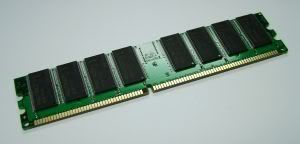
What is a computer memory?
Contrary to the popular belief, the term computer memory includes not
just the computer's main memory, so popularly known as the RAM but aslo
includes other memory modules available in the
microprocessor,motherboard, your video card and so on and even your hard
disk, but it is more popular as the secondary memory.
Before
we get to the business of selecting the RAM for your computer, lets get
familiar about computer memory and the various types available.
So
what is RAM anyway? RAM stands for Random Access Memory. Mark the
Random - it means that the memory, unlike the other versions of
electronic memory that we know of, like the tape or the hard disk,
doesnt need to search for data sequentially. In other words, the time
required to obtain any data remains the same regardless of its location.
The first and most important characteristic of RAM is that it is fast.
The
second characteristic of the Random Access Memory(RAM) is that it is
volatile. Which essentially means - no power, no memory.
Why do we need a computer main memory in the first place?
The
microprocessor of your computer is slowed up by rate at which data is
transferred to it. In the absence of a computer main memory, the data
rate goes down even further, thus resulting in undermining the true
potential of the processor.
How does the computer memory - main
memory that is, differ from the other types of RAM available on the
various chips? High speed RAM is found on various parts, like the
microprocessor itself - e.g. L1 cache - What is that?
The
microprocessor requires a high speed memory area wherein the
instructions and data can be held – that’s the L1 cache (For the Intel
Core 2 Duo E6700, the L1 cache is 128 KB). Apart from that, there is its
more popular level, the L2 Cache – That holds the instructions that
might be used shortly (For the aforementioned processor, it is 4 MB).
Now, the same memory, if available on the motherboard is classified as
the L3 cache.
So much for the various types of computer memory. And
again, we haven’t touched on the memory available on the video
cards/graphics adapters and the like.
(All that is fine, but what
about the jargon, DDR, SDRAM, DDR2 and the like?) Lets cut the history
and get ahead with SDRAM first. SDR SDRAM stands for Single Data Rate
Synchronous Dynamic RAM.
“Synchronous” because it operates at the system bus speed.
DDR
SDRAM – The DDR stands for “Double Data Rate”. Hence, it operates at
double the speed of SDR SDRAM and hence doubles up as the most popular
form of computer memory.
The higher version of DDR, the DDR2 has
already dominated the memory market despite some competition from RDRAM
(Direct Rambus) - which died down over time. Now of course, a DDR2 and
its successors rule the computer main memory market.
Getting to the part of selecting the computer main memory –
1.
What system are you using? As much as it sounds funny, RAM
incompatibility with motherboard needs to be verified, especially if you
plan to upgrade your system’s main memory.
2. What is your operating
system? As the complexity of the OS increases, the RAM requirement goes
along with it. Currently Windows Vista shows good performance with a 1
GB memory than with lower ones.
3. What programs do you intend to
use? If you are the compulsive gamer type, or use high memory
applications like simulations, graphics processing etc, you definitely
need higher computer main memory. 2GB for most high profile simulations
is the norm.
4. Pricing – Higher priced RAMs are priced higher than
other main memory counterparts because of the stringent testing they go
through, the density they possess and higher temperature capacity.
Betting on the high priced memory modules is a pretty safe option.
As
for the future of computer main memory, there is the Z-RAM with its
high density and capacitor-less bit configuration, which should offer
much more powerful options than the memory modules available today.